When building desktop applications, choosing the right GUI framework can greatly affect development experience, deployment, and long-term maintenance.
To compare different approaches, this project implements the same Postman-like API testing tool using two different technologies:
The goal is not to determine which framework is universally better, but to compare their practical strengths and limitations in real desktop application development.
The API client includes:
HTTP GET and POST requests Asynchronous network requests Cross-platform desktop GUI
Application Design
The application workflow is simple:
User Input
│
▼
HTTP Request Builder
│
▼
Network Request
│
▼
Response Processing
│
▼
GUI Display
Both implementations provide the same core functionality.
The difference is mainly in:
Implementing an API Client Using Go Fyne
Go provides a powerful standard library for network programming.
For HTTP communication, this implementation uses:
net/http
The Fyne framework is used to create the desktop interface.
Fyne provides:
Cross-platform GUI support Native Go development experience Single-language development
Go Fyne Implementation
Copy
package main

import (
	"bytes"
	"io"
	"net/http"
	"strings"
	"time"

	"fyne.io/fyne/v2"
	"fyne.io/fyne/v2/app"
	"fyne.io/fyne/v2/container"
	"fyne.io/fyne/v2/widget"
)

func main() {
	myApp := app.New()
	myWindow := myApp.NewWindow("Go API Tester")

	// --- 1. Top Request Configuration Components ---
	// Request method dropdown (GET/POST)
	methodSelect := widget.NewSelect([]string{"GET", "POST"}, func(value string) {})
	methodSelect.SetSelected("GET") // Default to GET

	// Media type dropdown
	contentTypeSelect := widget.NewSelect([]string{"application/json", "multipart/form-data", "application/x-www-form-urlencoded"}, func(value string) {})
	contentTypeSelect.SetSelected("application/json")

	// URL input field
	urlEntry := widget.NewEntry()
	urlEntry.SetPlaceHolder("Enter Request Address...")
	urlEntry.SetText("https://raw.githubusercontent.com/pixel-jey/exchange/main/rates.json") // Default address from the image

	// --- 2. Left and Right Text Boxes ---
	// Left side: Request body input field
	reqBodyEntry := widget.NewMultiLineEntry()
	reqBodyEntry.SetPlaceHolder("Request Body (JSON or parameters)...")
	reqBodyEntry.SetText("{\n  \"userId\": \"1781577778344\"\n}")

	// Right side: Response result display field (set as read-only implicitly by usage)
	resCodeLabel := widget.NewLabel("HTTP Status Code: Not Sent")
	resBodyEntry := widget.NewMultiLineEntry()
	resBodyEntry.SetPlaceHolder("Result (Response)...")
	resBodyEntry.Wrapping = fyne.TextWrapWord

	// --- 3. Core Network Logic for Send Button ---
	sendButton := widget.NewButton("Send Request", func() {
		resBodyEntry.SetText("Requesting...")
		resCodeLabel.SetText("HTTP Status Code: Waiting...")

		go func() {
			method := methodSelect.Selected
			urlStr := strings.TrimSpace(urlEntry.Text)
			bodyStr := reqBodyEntry.Text

			// Create HTTP client and set a 10-second timeout
			client := &http.Client{Timeout: 10 * time.Second}

			// Assemble the request
			var req *http.Request
			var err error
			if method == "POST" && bodyStr != "" {
				req, err = http.NewRequest(method, urlStr, bytes.NewBufferString(bodyStr))
			} else {
				req, err = http.NewRequest(method, urlStr, nil)
			}

			if err != nil {
				resBodyEntry.SetText("Failed to build request: " + err.Error())
				return
			}

			// Attach Content-Type header if it is a POST request
			if method == "POST" {
				req.Header.Set("Content-Type", contentTypeSelect.Selected)
			}

			// Execute the request
			resp, err := client.Do(req)
			if err != nil {
				resBodyEntry.SetText("Failed to send request (Please check your network or URL): \n" + err.Error())
				return
			}
			defer resp.Body.Close()

			// Read response body
			respBody, err := io.ReadAll(resp.Body)
			if err != nil {
				resBodyEntry.SetText("Failed to read response: " + err.Error())
				return
			}

			// Update the UI
			resCodeLabel.SetText("HTTP Status Code: " + resp.Status)
			resBodyEntry.SetText(string(respBody))
		}()
	})

	// --- 4. UI Layout Assembly ---
	// Top configuration bar layout: Method selection (100px) + Type selection (180px) + URL field (Auto-stretch) + Send button
	topRow := container.NewBorder(nil, nil, container.NewHBox(methodSelect, contentTypeSelect), sendButton, urlEntry)

	// Left panel: Contains request body
	leftPanel := container.NewBorder(widget.NewLabel("Request Body:"), nil, nil, nil, reqBodyEntry)
	// Right panel: Contains status code label and response body
	rightPanel := container.NewBorder(resCodeLabel, nil, nil, nil, resBodyEntry)

	// Split the interface equally between left and right
	splitGrid := container.NewGridWithColumns(2, leftPanel, rightPanel)

	// Overall layout: Top bar fixed, middle and bottom fill the split interface
	mainLayout := container.NewBorder(topRow, nil, nil, nil, splitGrid)

	myWindow.SetContent(mainLayout)
	myWindow.Resize(fyne.NewSize(900, 550)) // Set a reasonable initial window size
	myWindow.ShowAndRun()
}
Run:
First Build Experience with Fyne
One interesting point when using Fyne on Linux is the first compilation time.
The first execution may appear frozen:
Compiling...
(no output for a while)
This happens because Fyne uses graphical components based on OpenGL and CGO.
During the first build:
Native graphics dependencies are compiled
Depending on hardware performance, the first compilation may take from tens of seconds to a few minutes.
After compilation:
The application runs as a native binary No JVM installation is required
API Request Result
Example response:
{
  "USD_THB": 32.86,
  "USD_CNY": 6.77,
  "USD_PHP": 60.78
}
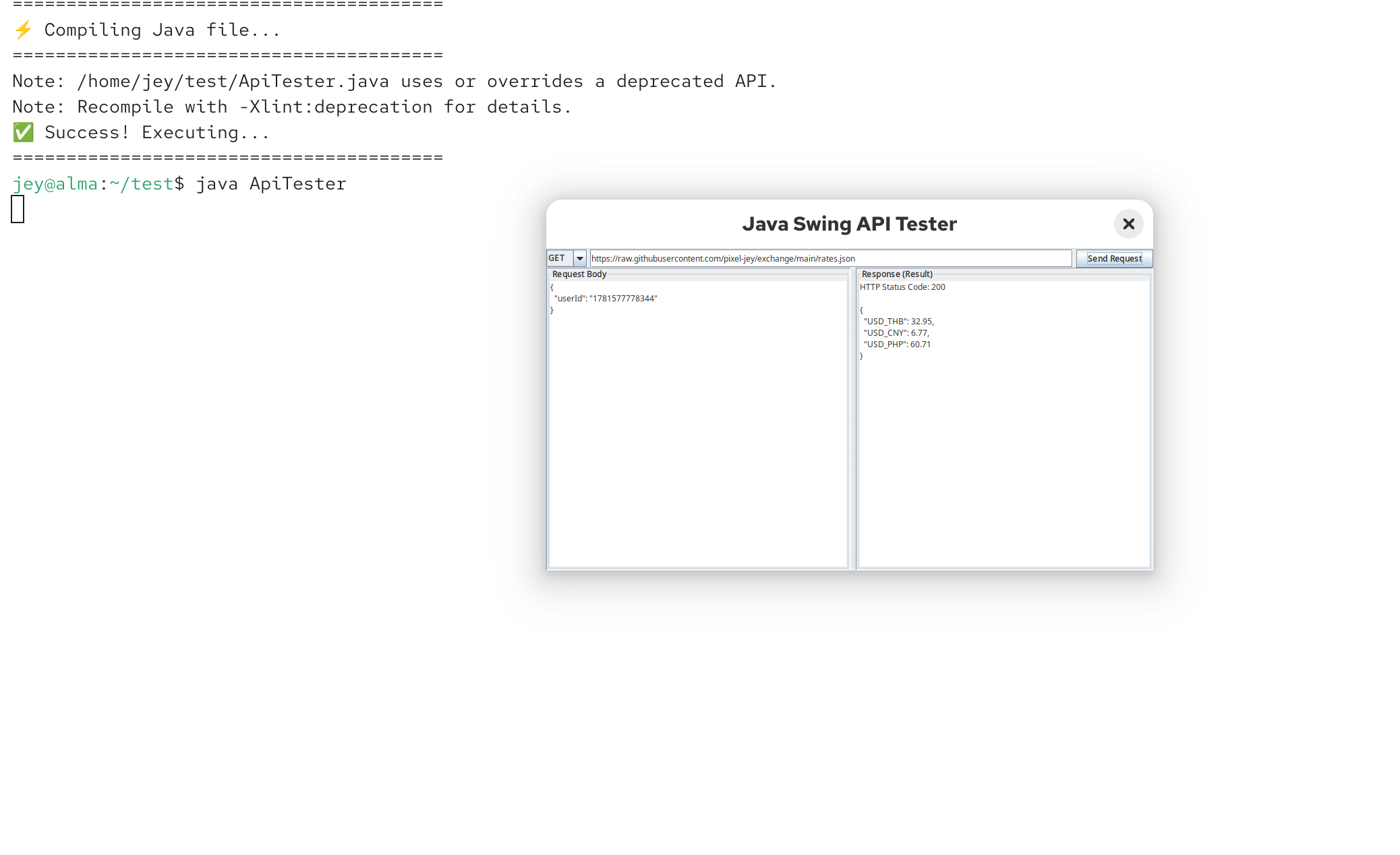
Implementing the Same API Client Using Java Swing
Java Swing has been available for decades and remains one of the most mature desktop GUI frameworks.
This version uses:
The goal is to implement the same functionality without external dependencies.
Java Swing Implementation
Copy
import javax.swing.*;
import java.awt.*;
import java.io.BufferedReader;
import java.io.InputStreamReader;
import java.io.OutputStream;
import java.net.HttpURLConnection;
import java.net.URL;
import java.nio.charset.StandardCharsets;

public class ApiTester {
    public static void main(String[] args) {
        // Create the main window
        JFrame frame = new JFrame("Java Swing API Tester");
        frame.setDefaultCloseOperation(JFrame.EXIT_ON_CLOSE);
        frame.setSize(900, 550);

        // --- 1. Top Bar Components ---
        JPanel topPanel = new JPanel(new BorderLayout(5, 5));

        // Dropdown selection box
        String[] methods = {"GET", "POST"};
        JComboBox<String> methodSelect = new JComboBox<>(methods);

        // URL input field
        JTextField urlField = new JTextField("https://raw.githubusercontent.com/pixel-jey/exchange/main/rates.json");

        // Send button
        JButton sendButton = new JButton("Send Request");

        JPanel leftTop = new JPanel(new FlowLayout(FlowLayout.LEFT, 0, 0));
        leftTop.add(methodSelect);

        topPanel.add(leftTop, BorderLayout.WEST);
        topPanel.add(urlField, BorderLayout.CENTER);
        topPanel.add(sendButton, BorderLayout.EAST);

        // --- 2. Middle Text Areas ---
        // Left side: Request body
        JTextArea reqBodyArea = new JTextArea("{\n  \"userId\": \"1781577778344\"\n}");
        JScrollPane leftScroll = new JScrollPane(reqBodyArea);
        leftScroll.setBorder(BorderFactory.createTitledBorder("Request Body"));

        // Right side: Response result
        JTextArea resBodyArea = new JTextArea();
        resBodyArea.setEditable(false); // Read-only
        resBodyArea.setLineWrap(true);   // Auto line wrap
        JScrollPane rightScroll = new JScrollPane(resBodyArea);
        rightScroll.setBorder(BorderFactory.createTitledBorder("Response (Result)"));

        // Split pane to divide left and right equally
        JSplitPane splitPane = new JSplitPane(JSplitPane.HORIZONTAL_SPLIT, leftScroll, rightScroll);
        splitPane.setDividerLocation(450);

        // --- 3. Core Network Request Logic ---
        sendButton.addActionListener(e -> {
            resBodyArea.setText("Requesting...");

            // Start a new thread for the network request to prevent the Swing UI from freezing
            new Thread(() -> {
                try {
                    String urlStr = urlField.getText().trim();
                    URL url = new URL(urlStr);
                    HttpURLConnection conn = (HttpURLConnection) url.openConnection();
                    conn.setRequestMethod((String) methodSelect.getSelectedItem());
                    conn.setConnectTimeout(10000);
                    conn.setReadTimeout(10000);

                    // If it is a POST request, attempt to send the request body
                    if ("POST".equals(conn.getRequestMethod())) {
                        conn.setDoOutput(true);
                        conn.setRequestProperty("Content-Type", "application/json");
                        try (OutputStream os = conn.getOutputStream()) {
                            byte[] input = reqBodyArea.getText().getBytes(StandardCharsets.UTF_8);
                            os.write(input, 0, input.length);
                        }
                    }

                    // Read the response
                    int status = conn.getResponseCode();
                    BufferedReader in = new BufferedReader(new InputStreamReader(
                            status < 400 ? conn.getInputStream() : conn.getErrorStream(), StandardCharsets.UTF_8));
                    String inputLine;
                    StringBuilder content = new StringBuilder();
                    while ((inputLine = in.readLine()) != null) {
                        content.append(inputLine).append("\n");
                    }
                    in.close();
                    conn.disconnect();

                    // Update UI
                    SwingUtilities.invokeLater(() -> resBodyArea.setText("HTTP Status Code: " + status + "\n\n" + content.toString()));

                } catch (Exception ex) {
                    SwingUtilities.invokeLater(() -> resBodyArea.setText("Request failed: " + ex.getMessage()));
                }
            }).start();
        });

        // Assemble overall layout
        frame.getContentPane().add(topPanel, BorderLayout.NORTH);
        frame.getContentPane().add(splitPane, BorderLayout.CENTER);

        // Center the window on screen and display it
        frame.setLocationRelativeTo(null);
        frame.setVisible(true);
    }
}
Run:
Copy
javac ApiTester.java

java ApiTester
Go Fyne vs Java Swing API Client
Comparing Development Experience
Both frameworks successfully implement the same API testing tool.
However, their development philosophies are different.
GUI Framework Maturity
Java Swing
Advantages:
More than 20 years of desktop development experience Large component ecosystem Stable behavior across platforms Mature event handling model
Swing is still a reliable choice for:
Long-term maintained applications
Go Fyne
Advantages:
Modern Go development experience Single language for backend and GUI
Fyne is suitable for:
Developers already using Go
However, compared with Swing, the desktop ecosystem is still younger.
Asynchronous Network Requests
Both implementations avoid blocking the user interface.
Go Fyne
Go uses goroutines:
Copy
go func() {

    // HTTP request

}()
The syntax is simple and fits naturally into Go's concurrency model.
Java Swing
Swing requires background execution:
Copy
new Thread(() -> {

    // HTTP request

}).start();
After completing the request, UI updates must return to the Swing Event Dispatch Thread:
Copy
SwingUtilities.invokeLater(() -> {

    // Update UI

});
Deployment Experience
Go Fyne
Advantages:
Can compile into a standalone binary No JVM installation required Easy distribution after building
Possible challenges:
Linux graphical dependencies
Java Swing
Advantages:
Excellent Linux compatibility Stable rendering behavior Large developer community
Possible challenges:
Application packaging requires additional consideration
Resource Usage
For small desktop utilities:
Both approaches are lightweight compared with Electron-based applications.
A simple API client does not require:
Hundreds of megabytes of dependencies
Both Go Fyne and Java Swing can provide efficient desktop applications.
Final Thoughts
This experiment shows that both Go Fyne and Java Swing can successfully build a Postman-like API client.
Go Fyne provides:
Modern development experience
Java Swing provides:
Neither framework is universally better.
The right choice depends on:
For modern lightweight utilities, Go Fyne is an interesting option.
For complex desktop applications requiring maximum stability and maturity, Java Swing remains a strong choice.
The best framework is not always the newest one.
Sometimes decades of real-world usage are also a valuable advantage.