Java 21 Virtual Threads vs Java 17 Thread Pools in Swing Applications
The Problem with Virtual Thread Pools
For example, when Swing issues a request, one thread keeps executing, which is very slow. If you want to stop all requests, and the thread is running continuously, you can't stop it once it's started. Currently, the only solution is to exit and restart the entire program. Is there a way to do this without restarting?
No, you don't need to restart. You can manually cancel all running background requests at any time by properly managing your threads.
In Java, directly "killing" a thread is unsafe (thread.stop() is deprecated). The most standard and lossless solution is to use a thread pool (ExecutorService), which allows you to shut down and rebuild the thread pool with a single click when cleanup is needed. Core solution: Use ExecutorService for unified management. You can use Java 21's virtual thread pool. When the user wants to clean up the thread pool with one click, simply shut down the old thread pool (shutdownNow()) and create a new one.
shutdownNow() only sends interruption signals.
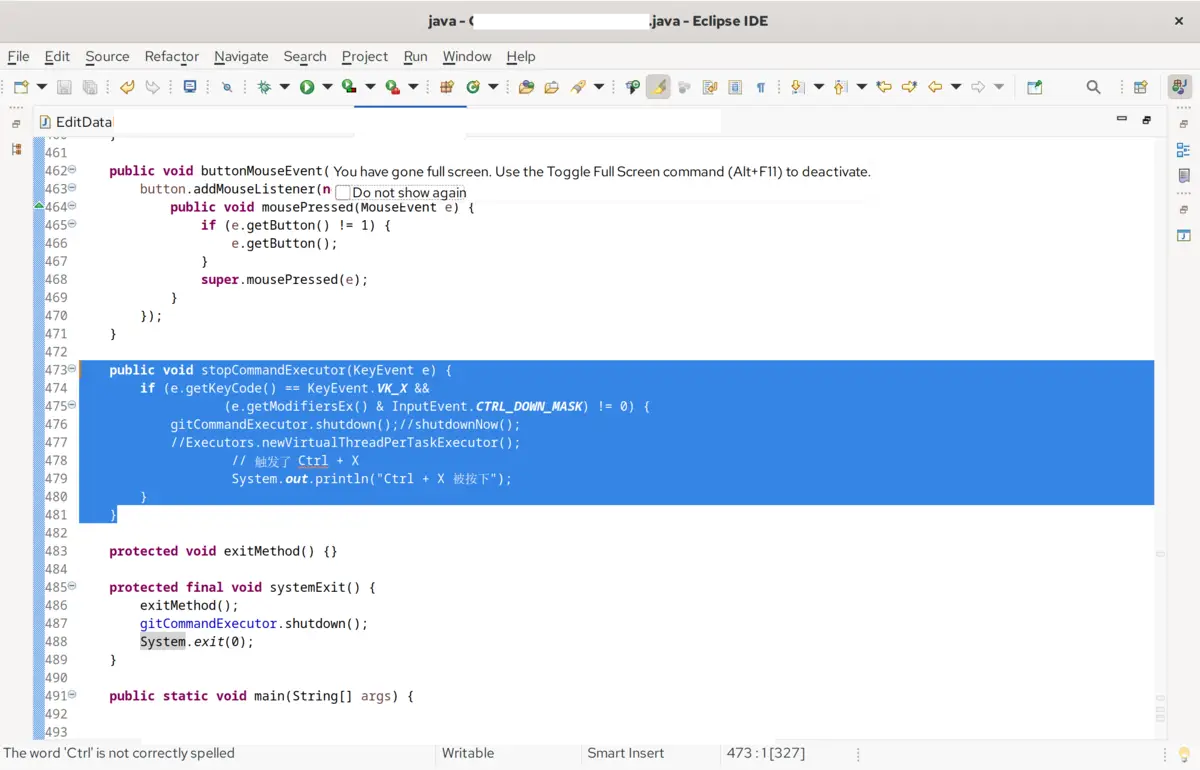
Tasks that ignore interruption requests may continue running until they complete.
- Define a global thread manager
- Write your time-consuming task (must respond to interrupts) For shutdownNow() to take effect immediately, your background network requests or time-consuming loop code must be able to respond to interrupt signals (InterruptedException or check Thread.currentThread().isInterrupted()).
- Handling the Swing "One-Click Cleanup" Button Place a "Cancel/Cleanup" button on your Swing interface. Clicking it will allow the user to click:
Why does this solution perfectly solve your problem? No restart required: shutdownNow() sends an interrupt() signal to all running virtual threads, causing them to exit immediately, thus freeing up CPU and memory. Seamless operation: After cleanup, the newly created executor is clean and usable again, and the user can immediately click the next request.
The interface remains smooth: all cleanup and requests occur in the background, keeping the Swing interface (EDT) constantly active.
If your class definition has the final keyword before gitCommandExecutor (e.g., private final) If you define `ExecutorService gitCommandExecutor;`, a compilation error will occur when reassigning it in the second step above. The solution is to remove the `final` keyword before `gitCommandExecutor` from the top of the class definition, making it a modifiable variable.
However, this is not entirely possible in Java 17. Directly writing `Executors.newVirtualThreadPerTaskExecutor()` will result in a compilation error.
This is because Virtual Threads were only officially introduced in Java 21.
As an early LTS version, Java 17's `Executors` class does not contain this method.
If you need to implement one-click cleanup and subsequent command execution in a Java 17 environment, you need to use a traditional platform thread pool (CachedThreadPool).
For Java 17 compatibility, please modify your code as follows:
Why use CachedThreadPool in Java 17? Is `newCachedThreadPool()` the most suitable? Java 21 Virtual Threads vs. Java 17 Thread Pools: Dynamic scaling: It behaves very similarly to virtual thread pools in Swing scenarios. When a new command comes in, it immediately creates a new thread to run it, preventing the interface from freezing. Perfect compatibility: It's a long-established API from Java 5 and is extremely stable in Java 17. Consistent functionality: When `shutdownNow()` is called, it also sends an interrupt signal to all running background commands, achieving immediate cleanup.
Explore More
› Java Swing Thread Optimization: Replace Thread with ExecutorService
› Java Swing: Why Lightweight Desktop Applications Still Matter on Linux
› Building a Postman-Like API Client: Go Fyne vs Java Swing