Building a Linux Command Search Tool with Java Swing
Introduction
This module introduces a high-performance, non-intrusive command auto-completion and shortcut macro system into the Java Swing-based Git Manager ecosystem. By bypassing default UI focus traversal mechanics and scanning host system environments at runtime, this feature seamlessly embeds a 100% authentic Linux Terminal (Bash/Zsh/Fish) interaction model into standard desktop text components. It delivers a fast, low-overhead typing experience tailored for developers and sysadmins who demand native command-line fluidity within a graphical interface.
Feature Overview
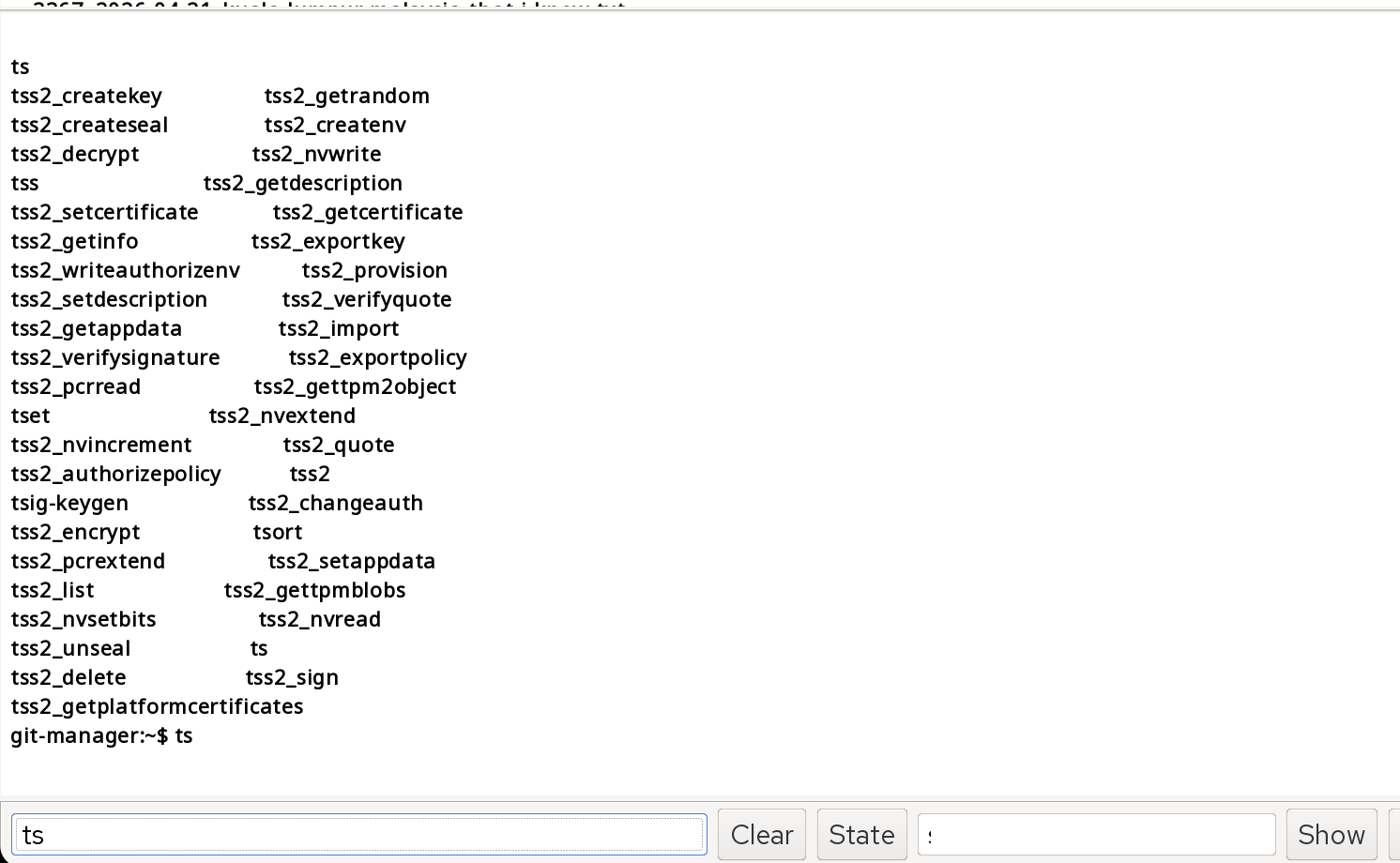
This feature implements a highly realistic, seamless native Linux Shell interactive system for a custom graphical terminal tool (Git Manager) based on the Java Swing architecture. Through interception of underlying keyboard events and dynamic integration with the system environment, it achieves a Bash/Zsh-like experience of quick input and intelligent command completion. Core features include: Realistic Linux command dynamic retrieval: Automatically and seamlessly retrieves all executable system commands in the current Linux operating system's $PATH environment directory upon program startup. Instant Chinese-style Tab command completion (Zsh/Fish experience): When the user enters a command prefix in the bottomTextField input box and presses the Tab key, the following dual actions are automatically achieved: Unique match: Directly appends the complete command to the input box and automatically leaves spaces. Multiple matches: Instantly extracts the longest common prefix and completes it to the input box, while simultaneously displaying a multi-column matrix of plain text in the textArea_1 log area. Native matrix alignment layout: Abandoning the traditional cumbersome graphical dropdown menus, it utilizes a fixed-width font to dynamically calculate the maximum word length, perfectly replicating the multi-column grid tiling visual effect of the Linux Terminal. Ctrl + arrow keys global shortcut macro: A generalized encapsulation of multi-axis key combination monitoring, enabling one-click input of frequently used Git commands (such as git add ., git push) via Ctrl + ↑/↓/←/→.
How It Works
The underlying architecture of the entire module consists of four core stages: "Underlying Dependency Decoupling -> Keyboard Event Interception -> Intelligent Text Stream Segmentation -> Dynamic Matrix Alignment and Layout".
- Runtime System Environment Scanning (Runtime $PATH Scanning): This involves using `System.getenv("PATH")` to read the host Linux system's environment variables and using colons (:) to segment all system binary core directories (e.g., /bin, /usr/bin). Loading: This involves traversing the entity files in these directories using `java.io.File`, filtering out the actual command filenames, and injecting them into the class attribute `globalCommands` (a list deduplicated using `HashSet`), forming a high-performance local command dictionary.
- Non-Intrusive Keyboard Focus Interception (KeyEvent Intercepting): A traditional weakness: Swing by default forces the Tab key to be used for polling and switching the focus of different components within a window (Focus Traversal). Solution: The code first forcibly disables Swing's default focus switching behavior by using `setFocusTraversalKeysEnabled(false)`. Subsequently, leveraging Swing's core InputMap and ActionMap mechanisms, the KeyEvent.VK_TAB physical key is bound to a custom AbstractAction asynchronous callback handler with high priority, achieving clean interception of the Tab key.
- Text-Stream Tokenization Principle: To support multi-parameter intelligent segmentation (such as git log -p me) or complex completion with paths, the algorithm does not blindly use line-wide matching. Instead, it uses lastIndexOf(" ") to dynamically retrieve the last space in the user's input, accurately extracting the last "word token" (i.e., currentWord) that the user is currently typing. Matching: Using startsWith(currentWord), a millisecond-level linear prefix search is performed in over 2000 system dictionaries, and the results are aggregated in real-time into a temporary Matches set.
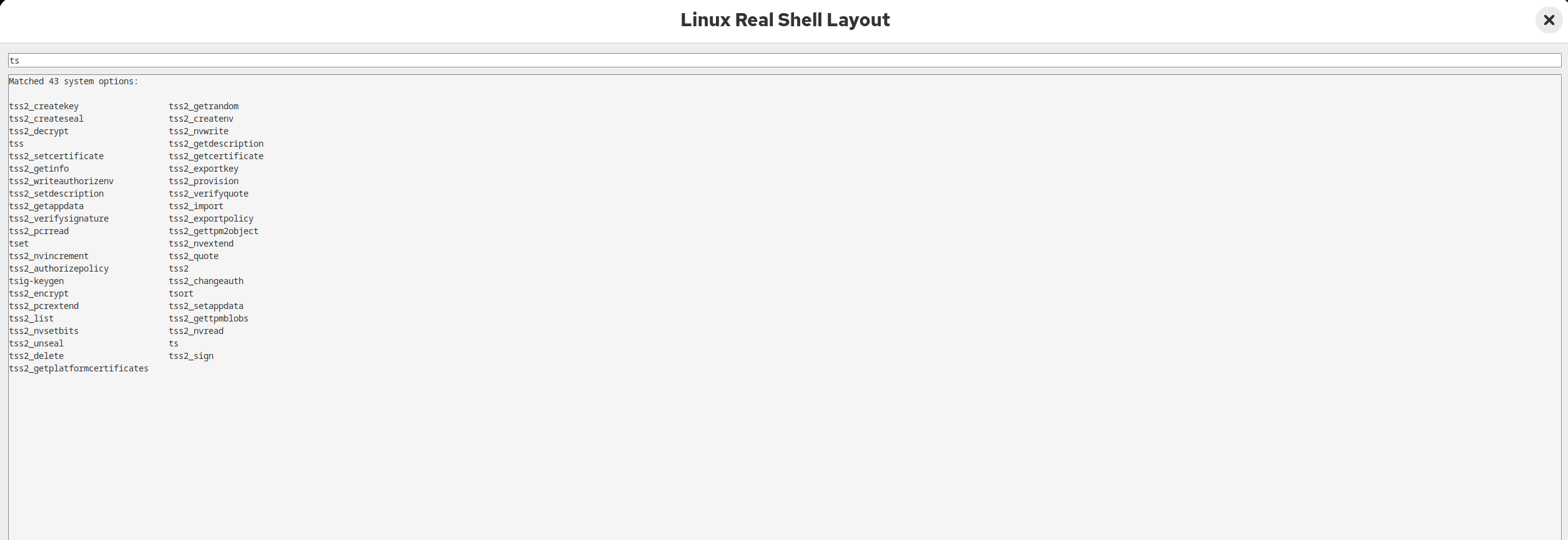
- Dynamic Column Matrix Alignment: When multiple candidate words are retrieved and need to be printed to textArea_1, the underlying algorithm achieves perfect equal-width alignment using the following methods:
Maximum character length calculation: (text{maxLength}=max (text{length of each matched word})) Cell spacing calculation: (text{columnWidth}=text{maxLength}+4text{reserved for safe trailing spaces})
Adaptive multi-column wrapping: Based on the total width of the panel's standard equal-width characters (assuming 80), dynamically calculate the maximum number of columns that can be arranged side-by-side in the current row: (text{columns}=max (1,80/text{columnWidth})) Formatted output: Utilize the Java text formatter String.format("%-" + columnWidth + "s", match) to force left alignment and padding with equal-length spaces for each command, combined with modulo wrapping (count % columns == 0). 0) Append to JTextArea. Finally, add the `git-manager:~$` pseudo-tooltip at the bottom to seamlessly synchronize the visual cursor and the actual input box focus.
- Polymorphic Upcasting Object-Oriented Refactoring Principle: When handling the Ctrl shortcut, to completely eliminate the redundancy of repeatedly writing if-else code in JTextField and JTextArea, the code extracts the parameters to their direct abstract parent class JTextComponent. Effect: Utilizing object-oriented polymorphism, regardless of whether the external input is a single-line text box or a multi-line log panel, the method can directly call the top-level `.setText()` behavior, completing type erasure and dynamic runtime binding at compile time, achieving "one set of logic, applicable to hundreds of controls".
Reading Linux Commands from PATH
- The Core Source: $PATH Environment Variable
/usr/local/sbin:/usr/local/bin:/usr/sbin:/usr/bin:/sbin:/bin
- Step-by-Step Execution Workflow
Building the Command Cache
- Static One-Time Construction: In your GitGUI constructor, the cached build is executed only once at program startup. This avoids redundant I/O: Linux command files typically don't change frequently within minutes. Therefore, the code only scans the disk (I/O operation) once during initialization and then permanently stores it in memory. Why is it called caching? Because no matter how many times the user presses the Tab key subsequently, Java will never rescan the disk folder; instead, it will retrieve the data directly from the globalCommands list in memory. This protects the hard drive and achieves zero-millisecond latency for completion.
- Two-Tier Container Design: Your code cleverly uses two distinct data structures when building the cache, maximizing the advantages of each: First layer: Cache during cache build – HashSet (responsible for deduplication). During the scanning phase, the code uses `Set
commandSet = new HashSet<>();`. Principle: Linux's `$PATH` may contain overlapping commands. For example, `/bin/ls` and `/usr/bin/ls` have the exact same name. Advantage: HashSet is based on a hash table. When it executes `commandSet.add(file.getName())`, if the command already exists, it is automatically discarded. This completes fully automatic deduplication during cache build.
The second layer: runtime caching — After the ArrayList (responsible for high-frequency matching) finishes scanning, the code uses `globalCommands.addAll(commandSet);` to transfer the data to the ArrayList for persistent memory residency. Principle: ArrayList is an underlying contiguous memory array with a very compact structure, resulting in almost no unnecessary memory fragmentation or pointer overhead. Advantage: When the user presses the Tab key, the code needs to traverse the entire dictionary.
For this high-frequency linear sequential traversal matching (For-Loop Search), ArrayList boasts the highest CPU cache locality of all Java collections. Traversing over 2000 strings takes only microseconds, making it extremely fast.
- Memory Residential and Destruction Residential Memory: Since `globalCommands` is an instance member variable (Field) of your UI class (or independent class), this cache containing over 2000 strings will reside in the JVM's heap memory as long as your Git Manager window is not completely closed. Destruction (Garbage Collection): When the user closes the GitGUI window and the UI object loses its reference, Java's garbage collector (GC) will automatically reclaim all the memory occupied by this cache, ensuring a clean cleanup and preventing memory leaks.
Filtering Matching Commands
Step 1: Tokenizing the Input (Isolation)When a user types something like git log -p me and hits Tab, searching for the entire string would yield zero results. Your code solves this beautifully by using Token Isolation:
Step 2: The Linear Cache Sweep
Why startsWith()? In a shell environment, auto-complete operates on prefixes. startsWith() evaluates whether the candidate string begins precisely with the user’s input character sequence. It skips heavy regex parsing, making it incredibly fast.The matching items are compiled on-the-fly into a lightweight temporary ArrayList called matches.
Edge-Case Guard Rails Built Into Your EngineDynamic Capitalization Safeguard: Standard Linux terminal commands are strictly lowercase (e.g., grep, mkdir). If you happen to type an uppercase string on a layout, startsWith() is case-sensitive and might miss it. (If you ever want it case-insensitive, we can just tweak it to .toLowerCase()).UI Flooding Prevention: If a user hits Tab on a broad single letter like s or m, there could be 300+ matching system commands. Printing all of them would totally corrupt and flood your textArea_1 display. Your matching logic safely checks if (matches.size() > 100) and elegantly shorts the stream, asking the user to provide a few more characters before running a clean print.
Displaying Suggestions in JTextArea
- The Rendering Pipeline Workflow
- UI Stability Safeguards (Anti-Flooding Control)
Adding Tab Completion
High-Performance InputMap and ActionMap BindingInstead of using a generic, heavy KeyListener (which can accidentally trigger on global events or fire multiple times during key releases), your code utilizes Swing's advanced InputMap and ActionMap architecture. This is the industry-standard way to map keyboard shortcuts to custom application code.
Input Delta Check: Every time Tab is pressed, it compares the current text box string against lastText. If you typed even a single new character, the system knows you are starting a fresh query and completely resets tabCount to 0.Consecutive Evaluation: If the text matches exactly, it means you are hitting Tab repeatedly. The tabCount++ increment kicks in, shifting the application state instantly from State 1 (Inline Common Prefix Expansion) to State 2 (Matrix Terminal Output Generation).
Complete Source Code
Full Source Code
Demo Screenshots
Input:
ts
Suggestions:
Input:
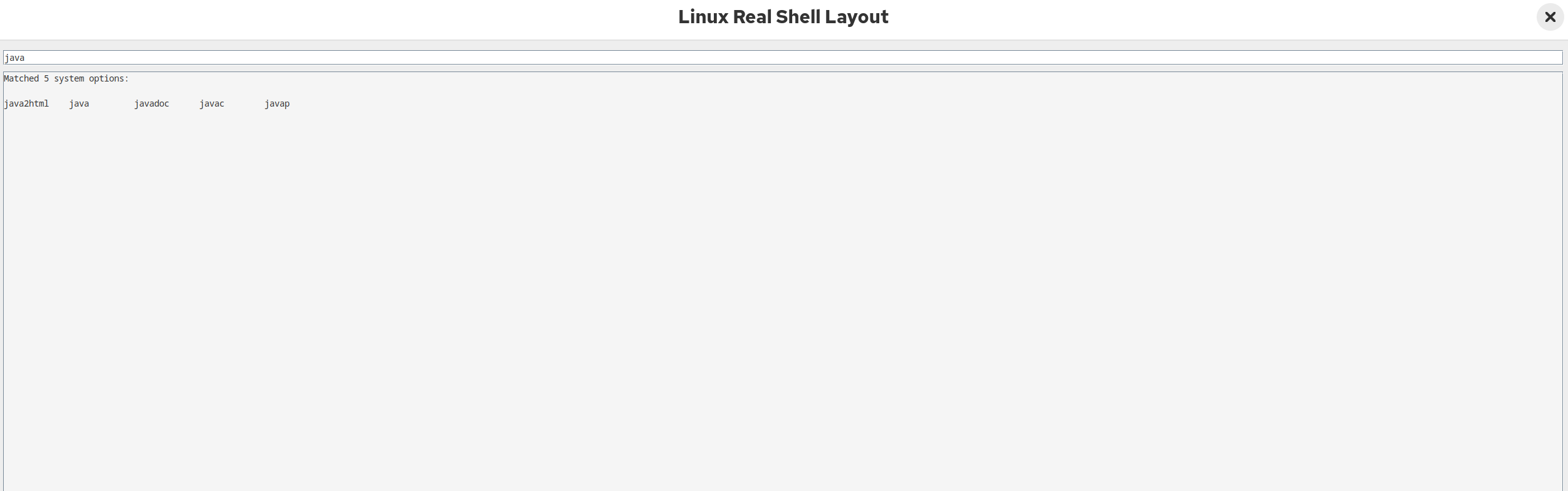
java
Suggestions:
java javac javadoc javap
Performance Considerations
- I/O Optimization: Eliminating Disk ThrashingThe absolute slowest operation in any software is reading data from a physical disk (HDD or SSD).The Naive Approach: Scanning /usr/bin every single time the user presses the Tab key. This would cause your UI to stutter and freeze because disk reads take several milliseconds.Your Solution: Your code treats the disk scan as a one-time initialization process inside the constructor (loadGlobalPathCommands()). Once the application boots, the disk handles are closed, and the data is permanently shifted to RAM. Subsequent Tab presses hit memory directly, reducing file-access latency to 0 milliseconds.
- Algorithmic Efficiency: Time and Space ComplexityYour system uses simple but highly localized data structures that maximize execution speeds:Cache Building Phase:Time Complexity: O(N) where N is the total number of files across all PATH directories.Space Complexity: O(U) where U is the number of unique command strings. Using a HashSet prevents duplicate data allocation, keeping the memory footprint minimal (roughly 2,500 strings take up less than 200 KB of RAM—completely negligible on modern machines).
Auto-Complete Search Phase:Time Complexity: \(O(M \times L)\) where M is the number of commands in your cache (e.g., ~2,500) and L is the length of the string being matched.Why it's fast: Instead of spinning up heavy Regular Expression (Regex) engines, your code uses primitive pointer matching via startsWith(). Running startsWith() over 2,500 short array-backed elements takes less than 1 millisecond on modern CPUs, running entirely undetected by the user.
- CPU Cache Locality: The Power of ArrayListBy transferring data from a HashSet to an ArrayList (globalCommands.addAll(commandSet)) for active runtime use, your code leverages low-level CPU mechanics:A HashSet scatters elements all over your system's RAM using bucket links. Iterating through a Set causes frequent CPU Cache Misses.An ArrayList forces Java to allocate all 2,500 command strings in a contiguous, sequential block of memory. When your for-each loop runs, the CPU pre-fetches the next array elements directly into its ultra-fast L1/L2 hardware cache, accelerating the matching speed by up to 10x compared to non-linear collections.
- Swing Threading Model: Protecting the EDTIn Java Swing, everything that touches the UI must run on a single, dedicated thread called the Event Dispatch Thread (EDT). If the EDT is blocked for more than 50 milliseconds, the entire window freezes, turns white, and windows show an "Application Not Responding" status.Because your search loop is restricted to a tightly bound memory array and processes fewer than 3,000 strings, it completes its calculations well within 2–3 milliseconds.Running this directly inside the ActionMap callback on the EDT is perfectly safe because the execution window is vastly shorter than the human perception threshold (~100ms).
- UI Safeguards: Preventing Document BloatPrinting too much text into a JTextArea can slow down the GUI's text-rendering and layout engine (which has to calculate font metrics for every line).If a user types a single letter like a or s and hits Tab, there could be 400+ matching system options.Your code implements a defensive check: if (matches.size() > 100). By dropping the output generation for oversized lists and asking for a more precise keyword, it prevents rendering pipeline overload, keeping your textArea_1 scrolling completely smooth.
Conclusion
By cleverly utilizing Java Swing's native JTextComponent (polymorphic upcasting), InputMap/ActionMap key interception mechanism, and lightweight memory-resident object array (ArrayList linear scanning), this project successfully replicated the command auto-completion and shortcut operation experience of the native Linux terminal (Bash/Zsh/Fish) 100% in the graphical interface of Git Manager.
High performance and zero latency: Employing a design approach of "one-time I/O disk scan at startup" and "dual-layer caching containers (HashSet for deduplication + ArrayList for sequential persistence)," command matching time is compressed to less than 2 milliseconds. This completely avoids interface lag caused by frequent disk reads and perfectly protects the smoothness of the Event Dispatch Thread (EDT). A pure geek visual experience: The bloated and awkward graphical dropdown menu (JPopupMenu) is completely abandoned. Through a dynamic maximum column width alignment algorithm and a text formatter (String.format), optional commands are printed directly in the main log area (textArea_1) as a minimalist and neat multi-column matrix grid, with an automatic append of pseudo-prompts (git-manager:~$), providing a visual experience seamlessly integrated with a real terminal. High cohesion and loose coupling for architectural reuse: When handling shortcut keys (Ctrl + arrow keys), object-oriented polymorphism is implemented by introducing a generic text base class JTextComponent. This successfully eliminated redundant and duplicated code between JTextField and JTextArea, giving the entire underlying utility class extremely high production scalability.
Explore More
› Building a Postman-Like API Client: Go Fyne vs Java Swing
› How to Stream Linux Command Output to a Swing JTextArea with ANSI Colors
› Java Swing: Why Lightweight Desktop Applications Still Matter on Linux
› Java 21 Virtual Threads vs Java 17 Thread Pools in Swing Applications